
NSDL PAN Document Resizer – Photo, Signature & PDF Resize
NSDL PAN document resizer. Resize NSDL/Protean PAN documents and PDFs up to 300 KB, plus PAN card photo and signature images to selected pixel and KB sizes. Crop without stretching, preview the result, and download in your browser. Free, no signup.
PAN Card Photo Resize
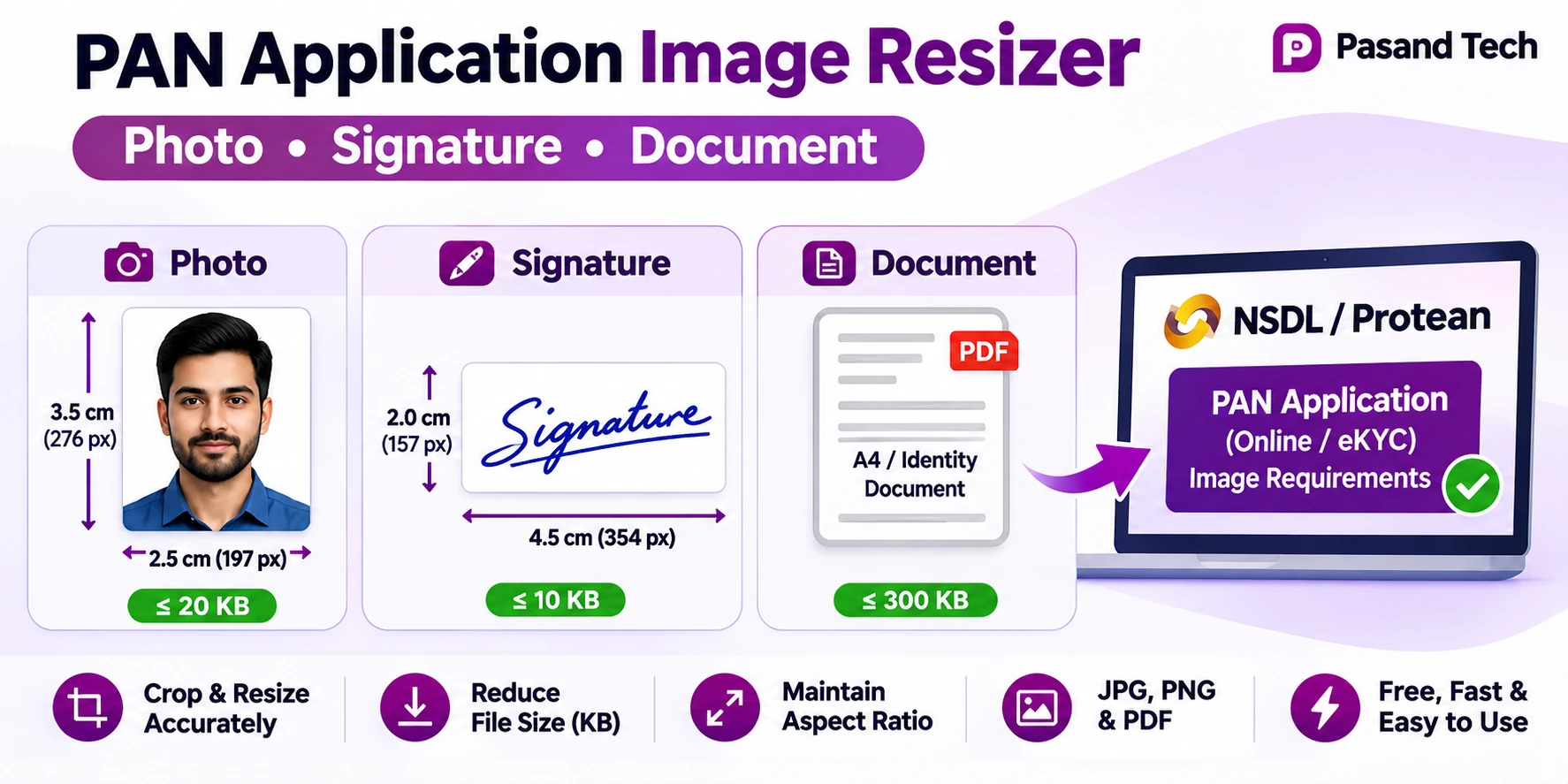
197 × 276 px · max 20 KB · portrait
Choose the preset required by your PAN portal. Cropping preserves proportions.
PAN Card Signature Resize
354 × 157 px · max 10 KB · landscape
Choose the preset required by your PAN portal. Cropping preserves proportions.
NSDL PAN Document / PDF Resize
Images: 800 × 1131 px JPEG · PDFs: PDF output ≤300 KB
Image crop keeps its ratio; PDF keeps every page in PDF format (maximum 300 KB).
📷 Editor
How to resize PAN card documents, photo and signature online
Need to resize a document for NSDL PAN card upload, compress a PAN application PDF to 300 KB, or resize a passport-style PAN card photograph or signature? This free Pasand Tech tool provides three separate workflows in one page. Choose the correct card above before uploading.
- Choose the tool: PAN Card Photo, PAN Card Signature, or Supporting Document / PDF.
- Match your application: Choose a preset and maximum KB based on the requirements on your actual Protean/NSDL or other portal screen.
- Upload and crop: For JPG, PNG or WebP, adjust the crop without stretching. For a document PDF, preview the first page and retain the PDF format.
- Check and download: Confirm output dimensions, KB and document readability. PDF downloads are blocked if they exceed 300 KB.
For documents that contain small Aadhaar text or QR codes, inspect the downloaded PDF at 100% zoom before submitting it. File-size compliance does not guarantee portal acceptance.
NSDL / Protean PAN photo, signature and document size requirements
There is no single image limit for every PAN application journey. Protean's published DSC scanned-document guidance lists the following values; another Protean article describes different limits for some scanning workflows. Use the specifications shown on your actual application page before selecting a preset.
| File | Published specification | Tool output |
|---|---|---|
| PAN photograph | Colour JPEG, 3.5 × 2.5 cm (height × width), 200 DPI, max 20 KB | 197 × 276 px / 20 KB default, or 213 × 213 px alternative |
| PAN signature | Colour JPEG, 2 × 4.5 cm (height × width), 200 DPI, max 10 KB | 354 × 157 px / 10 KB default, or 400 × 200 px alternative |
| Supporting document | PDF/A or JPEG, 200 DPI, maximum 300 KB per page in the referenced DSC guidance | PDF input → PDF output, strict 300 KB total tool cap; image input → JPEG |
Note: Pixel dimensions are approximations derived from physical dimensions at 200 DPI. A browser JPEG may not embed DPI metadata even when its pixel count matches. This tool does not certify PDF/A compliance or official acceptance. Source: Protean's official scanned-image guidelines.
PAN Card Photo Resizer: resize a photograph without distortion
Resize photo for PAN card
Select the Photograph card, choose the appropriate preset, upload a clear portrait and drag the crop around the face. The crop maintains the selected width-to-height ratio, so facial proportions do not stretch.
Photo dimensions and KB
Start with the Protean 197 × 276 px, 20 KB preset if the form calls for that specification. The 213 × 213 px square preset is available when the application explicitly requests a square image. Review the final JPG preview and file size.
Why a PAN photo is rejected
Common reasons include wrong dimensions, excessive KB, poor lighting, clipped head, unsuitable background, low clarity, or a mismatch with the specific application method.
Photo cropping versus squeezing
Cropping trims the outside of the picture while keeping the face natural. Stretching makes a face wider or taller; this tool avoids intentional distortion.
PAN Card Signature Resizer: resize signature in pixels and KB
To resize your signature for a PAN card application, sign clearly on plain white paper, photograph or scan the page, then use the Signature card. Choose the required preset, move the crop window to include all strokes, and leave a small white margin around the signature.
For the Protean DSC workflow, use the 354 × 157 px / 10 KB preset where applicable. A wider 400 × 200 px preset is available for portals requesting different values. Check the downloaded JPEG carefully; an image can meet a KB cap but still be too faint for acceptance.
NSDL PAN PDF resize and document compression to 300 KB
The Supporting Document card handles document images and PDF files. A PDF stays a PDF on download, including all pages. If the original PDF is already 300 KB or smaller, it is preserved unchanged; larger PDFs are rebuilt only if a result meets the strict total file-size limit.
For larger PDFs, the current in-browser compressor tries multiple rendering scales and JPEG quality levels while prioritizing readability. This can flatten selectable text, embedded links, fillable forms, and digital signatures. It does not guarantee that a complex PDF will fit under 300 KB at readable quality. In that situation the tool refuses the oversized export rather than silently downloading a poor-quality document.
Visual guide: photo, signature and PDF resize
Troubleshooting PAN upload errors
Photo or signature exceeds KB
Use the appropriate limit, start with a clean source, and download the highest quality file that fits. Very noisy scans are harder to compress.
Incorrect image size or ratio
Check the portal's pixel requirements; select the matching preset before cropping. Avoid changing the final image's dimensions in another editor.
PDF rejected despite being below 300 KB
The portal may require PDF/A, per-page limits, a signed original, or a different document type. KB size is only one requirement.
Blurry PDF text
Use an original digital PDF or better scan. Increasing DPI cannot recover details missing from the original or reverse heavy compression.
Frequently asked questions about NSDL PAN photo and document resizing
How do I resize a photo for NSDL PAN card online?
Choose the Photograph tool, use the required portal preset, upload your picture, adjust the crop without stretching, and download the JPG after checking pixels and KB.
What is the NSDL PAN photograph size?
Protean's DSC scanned-image instructions state a colour JPEG photograph 3.5 × 2.5 cm at 200 DPI, maximum 20 KB. Application methods can have different limits, so check the form.
How can I resize a PAN card signature to 10 KB?
Choose the Signature tool, select the Protean preset if suitable, crop the entire signature with whitespace around the strokes, then download the JPEG under the chosen limit.
Can I resize both PAN photo and signature on one page?
Yes. The Photo and Signature cards work independently, with their own dimensions, previews, file limits and downloads.
How do I resize an NSDL PAN document PDF to 300 KB?
Upload the PDF in the Supporting Document card. The tool preserves the original when it already fits or attempts compression; it only enables PDF download when the total output is no more than 300 KB.
Will the PDF stay in PDF format?
Yes. Uploading a PDF to the document tool produces a PDF, not a JPG. Image uploads produce JPG files.
Why is my Aadhaar PDF unclear after compression?
Rasterizing pages and compressing images can blur fine lettering and QR codes. Use a sharp original; if the readable PDF cannot fit within 300 KB, the tool does not offer an oversized file.
Does this tool write 200 DPI into the JPG?
No. Its image presets set pixel dimensions, but physical DPI metadata is not guaranteed in the exported JPEG. The PDF rendering engine uses selected render scales internally.
Can this tool guarantee acceptance by Protean or UTIITSL?
No. Portal requirements vary by workflow, and acceptance also depends on document type, readability and validity.
Is this NSDL PAN resizer free and private?
Yes, the resizer is free and processes selected file data locally in the browser. The page may load external libraries and WordPress scripts; avoid sensitive processing on untrusted devices.
Related free tools by Pasand Tech
About this independent PAN document preparation tool
Pasand Tech offers a browser-based utility for resizing existing images and documents for application uploads. It is not affiliated with NSDL, Protean, UTIITSL or any government issuing authority. It cannot verify PAN applications, issue cards, validate scanned proofs or change government identity information. Use authorized source files only.